 Miravo
Runtime Control in the Miravo Console
Operate the runtime engine, manage MQTT, OPC UA, and Modbus adapters, inject faults, and reset the active environment from the browser.
The /control route is Mission Control for the running environment.
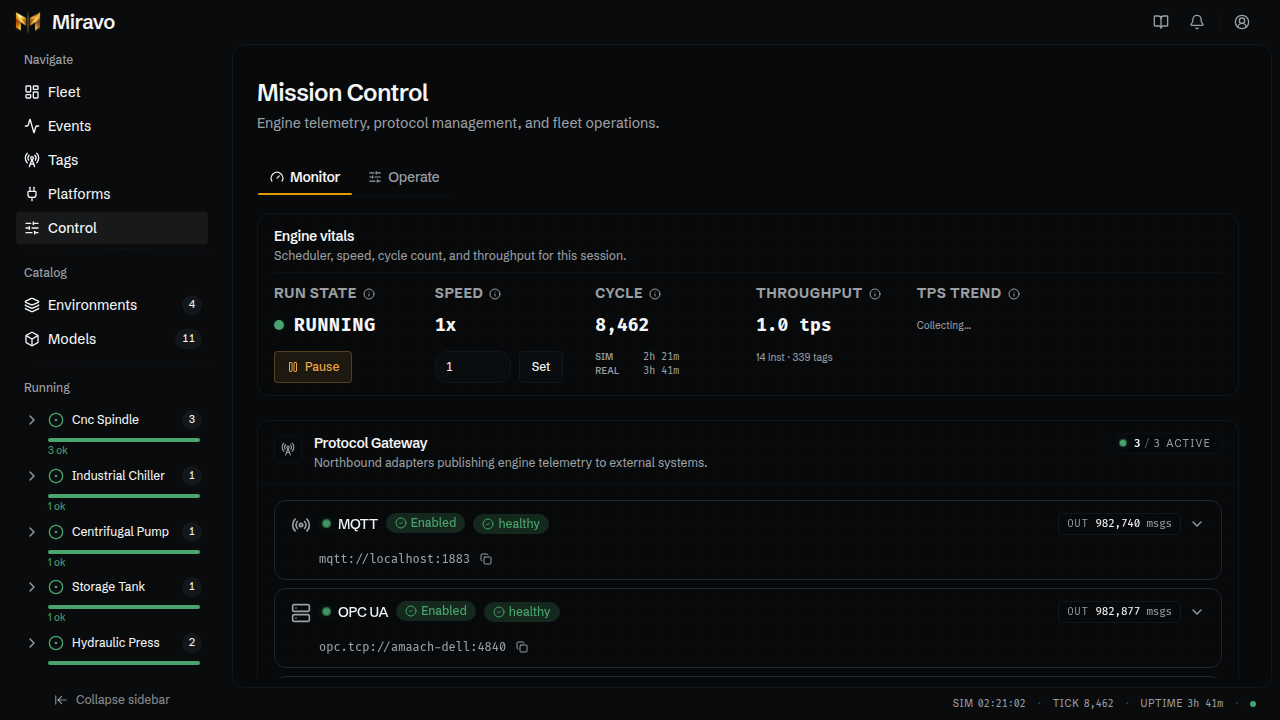
Monitor
The Monitor tab shows engine vitals and protocol gateway state.
Engine vitals include:
- run state
- speed multiplier
- cycle number
- simulation time
- real uptime
- tag throughput
- throughput trend
The protocol gateway shows each registered adapter, including MQTT, OPC UA, and Modbus TCP when enabled.
Adapter cards show:
- enabled state
- health state
- published message count
- connection URL
- adapter-specific metrics
Operate
The Operate tab contains runtime action stations:
- fleet operations
- fault injection
- instance actions
- environment reset
Use instance actions to remove or unquarantine selected instances.
Use fault injection to trigger or clear supported model faults.
Reset
The reset action removes running instances and loaded environments. It can also clear persisted state.
Reset changes runtime state
Reset is an operator action. Use it only when the current environment should be unloaded.
Was this page useful?
Catalog browser in the Miravo Console
Browse built-in environments and asset models, inspect source YAML, launch content, and export platform files from the Miravo Console.
Platform operations in the Miravo Console
Save platform targets, apply templates, clean up managed resources, inspect Litmus Edge exports, and audit every platform run.