 Miravo
Runtime Events in the Miravo Console
Read the Miravo runtime event log, separate operator alerts from chronological events, and inspect state changes from the active environment.
The /events route shows the chronological runtime log.
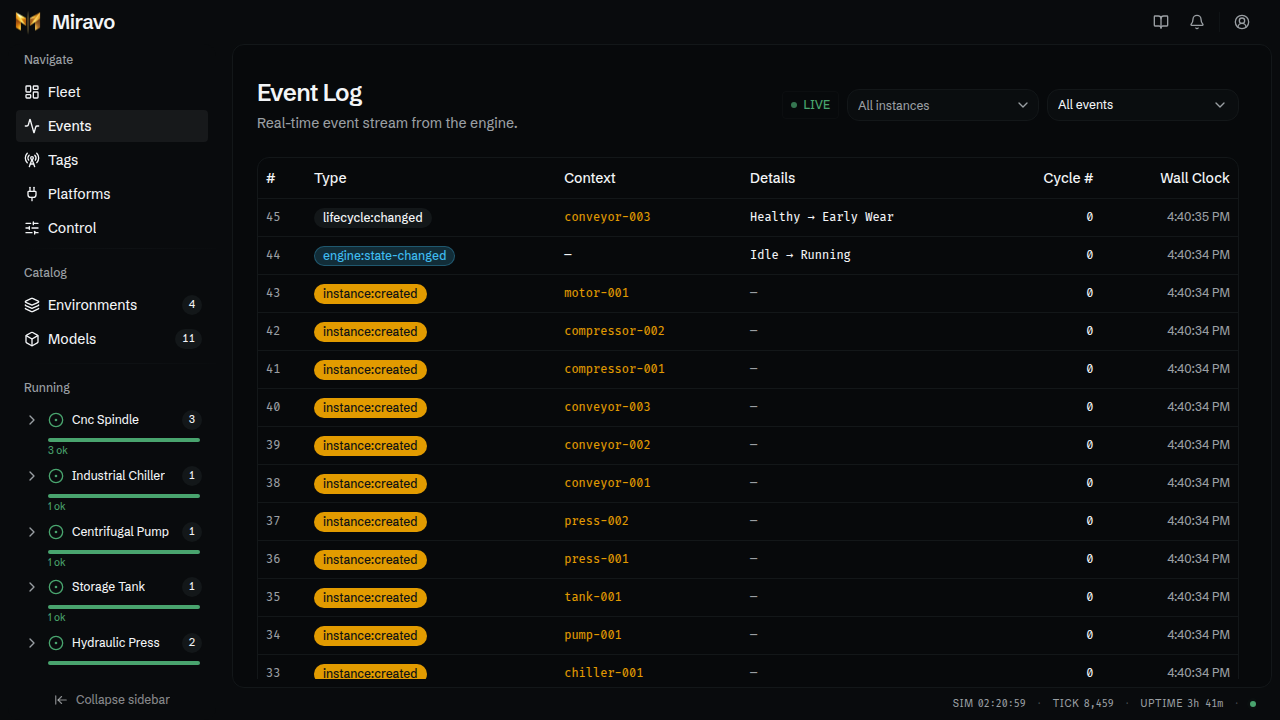
Event log
Events include:
- fault trigger and clear events
- lifecycle stage changes
- instance creation and removal
- engine state changes
- adapter enable and disable events
Each row shows event number, type, context, details, cycle number, and wall-clock time.
Alerts
The header bell is the operator alert inbox.
Alerts are derived from live counters and runtime events. Warning and critical alerts appear there instead of mixing with the chronological log.
Alert behavior:
- Active fleet faults raise a persistent warning until faults clear.
- Active critical alarms show a persistent critical banner.
Clearhides a live alert until the underlying condition clears once.- Recent alert history is scoped to the browser session.
Use /events for trace history. Use the alert bell for action-oriented operator signals.
Was this page useful?
Fleet view in the Miravo Console
Use Fleet to inspect runtime health, filter live asset instances, open instance detail pages, and follow the active environment state.
Live tag manifest in the Miravo Console
Filter the live tag manifest, inspect protocol-facing values, and export CSV or platform-ready tag files from the Miravo Console.